 support@codesigncert.com



Comodo Code Signing at £169.58
Buy Comodo Code Signing Certificates for robust security for digital assets like Software, EXE, Scripts, and estabish a brand connections.
Comodo Code Signing Certificate is a software security certificate. It verifies the authenticity and integrity of software and web applications. It ensures the software package is not altered during the development or testing.
Comodo Code Sign certificate secure code for Windows kernel-mode software and driver software. It must digital shield for software publishers or developers. It establishes trust and confidence with their customers and protects their software. It prevents malicious actors from stealing software files like .exe, .ocx, .dll, and .cab files.
 Time Stamp
 Increase Downloads
 Unlimited App Signing
 Remove Warnings
 24/7 Live Support
 30 DAYS REFUND
To maximize security, Code Signing Certificate validity is restricted to one year for Token + Shipping delivery option. You can still purchase 3-year plans for Install on Existing HSM orders, but they now require annual re-issuance.
A Comodo Code Signing Certificate includes an embedded digital signature. It verifies software codes, scripts, and other necessary digital executable files. Code signing helps users ensure they have a secure software program. It confirms that the software package has been verified by a trusted Certificate Authority. Additionally, the digital signature reassures users about the safety of their computers.
 Delivery Mode
FIPS-140 Level 2 USB or Existing HSM
 Secure Key Storage
Stored on an External Physical Device
 Issuance Time
3 to 5 Business Days
Key Security Features of Comodo Code Signing Certificate
- It verifies the publisher's or software developer's identity.
- It safeguards software packages and web applications from meddling.
- It verifies the integrity of software packages, web applications, scripts, and executable files.
- It eliminates the “unknown publisher” Windows error message while unzipping software packages.
- It improves client or software users' trust and confidence.
- It boosts up software packages and web application downloads.
- It delivers and protects the brand reputation of software publishers.
- It's recommended for commercial software distributors and publishers.
- It creates a trust and confidence bridge between software publishers and distribution outlets.
- It prevents Windows warnings like “untrusted” or “unsigned” while uploading or downloading.
- It maintains the legitimacy of the software packages and web apps like executables.
- The software program can't be altered, tampered with, corrupted deprived of detection.
- It's 100% compatible with all the latest versions of operating systems like Windows, and Mac.
- It takes 1 to 3 business working days for issuance.
Benefits of Code Signing Certificate

User Trust & Confidence
It gives users a secure experience with the integrity of software and it has not been modified since it was signed by the digital signature technology.
Industry Standard Technology
It won't allow users to download software without verification of Digital ID and signature from Certificate Authority (CA).
Ease to Deploy
It can sign to protect various elements of software such as firmware images, objects, configuration files, virus updates macros, and device drivers.
Eliminate Unknown Publisher Warnings
With a robust digital signature, it eliminates unknown publisher warnings, assuring users that the software is genuine and from a verified publisher, thus improving download rates.
Authentication
Once user complete the process of downloading then users can be assured their self that code or scripts came from certified software publisher. It will improve the software vendor or publisher's online reputation. And, it will also increase the number of downloads of software programs on the Internet.
- Digital signature for 32-bit, 64-bit, exe files, .ocx, .dll, .cab files & kernel mode drivers.
- Protect Java™, Microsoft™ VBA, Microsoft™ Office Documents & other Software.
- Digital signature for all major Desktop Platforms such as Microsoft Authenticode, Adobe, & Brew.
- 24/7 support from experts to deliver code signing digital security certificate issuance.
- 100% assurance of your software security with an unlimited digital signature.
Steps to Use Comodo Code Signing Certificate
The process explains the use of Microsoft Authenticode and Comodo Code Signing Certificate.
- Step 1: Confirm that you are running the right versions of all Tools:
- Step 2: Apply for a Code Sign signing ID for Authenticode from Comodo
- Step 3: Complete Verification and Download the Digital ID
- Step 4: Arrange your Files to be signed
- Step 5. Sign the Files
- Step 6: Assessment Your Signature
Compare Code Signing Certificates and Buy at the Best Price
| RSA Encryption Key | 3072-bit or 4096-bit | 3072-bit or 4096-bit | 3072-bit or 4096-bit |
| Issuance for Individual Developers |

|
|

|
| Universal Platform Compatibility |
|
|
|
| Supported File Formats | 32-Bit And 64-Bit | 32-Bit And 64-Bit | 32-Bit And 64-Bit |
| Issuance Time | 4 to 8 Days | 4 to 8 Days | 1 to 5 Days |
| Validation Required | Business/Individual | Business/Individual | Business |
| Visible Trust Indicator | Digital Signature | Digital Signature | Digital Signature |
| Physical USB Token Storage |
|
|
|
| Displays Business Name |
|
|
|
| Publisher Name on the Certificate |
|
|
|
| Sign Unlimited Code, Scripts & Executables |
|
|
|
| Separate Private Key Storage |
|
|
|
| Refund Policy | 30 Days - Full Refund | 30 Days - Full Refund | 30 Days - Full Refund |
| Vendor Price | 379.00/Year | 379.00/Year | 499.00/Year |
Buy Now 
|
Buy Now
|
Buy Now
|
 Sectigo Code
Signing
Sectigo Code
Signing
 DigiCert Code
Signing
DigiCert Code
Signing
From Purchase to First Signed Build: Your Code Signing Walkthrough
Getting a code signing certificate involves more steps than a typical SSL, mostly because your private key lives on hardware, not a server.
Here's the full path from order to signed executable.
Pick Your Code Sign Certificate and Key Storage Method
Select OV or EV based on your publishing needs, then decide how your private key will be stored.
Standard orders come with a CA-provisioned hardware token shipped to your door.
If you already own a FIPS-compliant token or HSM (YubiKey, Thales Luna, Google Cloud KMS, etc.), most CAs will provision to your existing hardware instead.
Fill Out the Enrollment Form
After checkout, you'll get an enrollment link by email or via your account dashboard.
Submit your name, organization details, and contact information. Standard token orders skip the CSR step, the CA handles it.
If you're using your own hardware, you'll paste your CSR here.
Clear Identity Validation
The CA's vetting team will verify who you are and, for OV/EV, that your business is legitimate.
Have your government-issued ID, business registration documents, and a reachable phone number ready. EV takes 3–5 business days;
OV is typically faster if your documents are clean.
Set Up Your Token
Once validated, your certificate ships on a pre-configured hardware token.
Install the token driver, plug it in, and set your PIN as instructed.
Your private key is locked to that hardware — it cannot be exported by design.
Sign Your First EXE or Files
With the token connected, sign your executables using SignTool or your platform's equivalent.
Always include a trusted timestamp ( /tr flag), without it, your signature becomes invalid the moment your certificate expires.
Verify Signed EXE Details Before Launching Your Software
Right-click the signed file on Windows and check the Digital Signatures tab, or run signtool verify from the command line.
Confirm your publisher name, issuing CA, and timestamp are all showing correctly. Once that checks out, you're ready to distribute.
How to Process & Install Code Signing Certificate Using Yubikey Manager?
Have questions about the Code Signing Certificate validation or installation process?
Check out our video tutorial and follow our step-by-step guide to simplify your code signing validation and installation!
Why Purchase Cheap Comodo Code Signing from CodeSignCert.com?
CodeSignCert.com is committed to delivering reliable digital certificates to software publishers. Here are a few reasons why you should buy a Comodo code signing certificate from us:
Trusted by All Major Web Platforms:
- Comodo Code Sign Certificates are recognized by all major web platforms like;
- Microsoft Silverlight Applications
- Adobe Air applications,
- Mozilla Object Files
- Microsoft Windows 8 and above
- Java applications and java applets
- MS office Macro files
- Visual Basic for Applications
- Kernel mode files like .dll, .cab, .ocx, .xap, .msi, .xpi, and .exe.
Quick and Easy Validation Process
Our code signing validation process is easy and quick to issue your certificate. We offer multiple validation options including email, phone, and public directory.
Excellent Customer Support
Our support team is available 24/7 to assist you with any questions or concerns you may have. We strive to provide the best customer service in the industry and are always happy to help.
Affordable Pricing
We offer competitive pricing on Comodo code signing certificates, ensuring the lowest pricing.
Quick Issuance
With our easy issuance process, you can get a code signing certificate in a few working days. It allows you to start signing code and distributing software.
CodeSignCert.com is an ideal choice for low-cost Comodo code signing certificates. Our commitment to affordability and customer support sets us apart from the competition. It is making us the clear choice for your digital code signing certificate needs.
What is Cheap Code Signing?
It's a digital signature algorithm, contains two types signatures such as 32 Bit and 64 bit. It plays a major role for software publishers and software developers. It helps to keep user's trust and confidence in software code and content while they download them on a web. Microsoft Authentication technology comes with Digital IDs that includes Comodo Code Signing Certificate.
A code signing certificate adds an ample amount of benefits with secure software. The software publishers and web developers will have the advantages such as;
Authenticated Source
The software signed and verified by code signing will have enough trust in a case of online security. Users will download software code without worry of compromise code.
Software Integrity
After signing with a code signing, a user will have confidence that it hasn't been modified since it authenticated by Certificate Authority (CA)
A code signing is an encryption tunnel between software developers and users. It creates digital trust and relationships including ActiveXT controls and signed software files. It builds trust and confidence in users while browsing through a web page for software.
A comodo code signing certificate is an affordable software publisher certificate. It includes the premium layers of security, which are higher than other certificates. It's one of the recommended code sign cert solution for software files such as;
- Software code, content, & scripts.
- Firmware images and objects.
- Configuration files, anti-virus updates, macros, and device drivers.
Code Signing Certificate Compatibility Supported by All Major Platforms
Achieve cross-platform compatibility with trusted code signing certificate for secure software and application distribution.


Why Choose CodeSignCert for Code Signing Security Certificates?
 Dedicated Code Signing Specialists
 Real Human Support — Anytime You Need It
 Step-by-Step Setup Resources
 Best-Value Pricing from Trusted CAs
 Hassle-Free Renewals & Reissues
 Verified & Trusted Certificates Only
 Policy Change Alerts & Industry Updates
 30 Days Risk-Free Purchase Protection
OV Code Signing Vs EV Code Signing
Understand key differences between OV (Organization Validation) and EV (Extended Validation) Code Signing Certificates. It highlights technical aspects such as validation levels, identity verification processes, trust levels, issuance times, costs, user experience, browser compatibility, revocation processes, purposes, and security features. Here’s a comparison between the two:
| Features |
EV Code Signing
Extended Validation
£222.49
/yr
Buy Now
|
OV Code Signing
Organization Validation
£169.58
/yr
Buy Now
|
|---|---|---|
| Certificate Type | EV Code Signing Certificate | OV Code Signing Certificate |
| Validation Level | Extended Validation | Organization Validation |
| Identity Verification | Extensive verification of the organization | Validates the organization |
| Trust Level | High Trust Level | Moderate Trust Level |
| Issuance Time | Up to 2 days due to rigorous checks | Typically faster |
| Cost | Higher cost | Lower cost |
| User Experience | Publisher name shown with enhanced trust indicators | Publisher name shown |
| Platform Compatibility | Supported by most browsers and platforms | Supported by most browsers and platforms |
| Revocation | Simpler revocation process | Revocation process may vary |
| Best For | High-value applications & software publishers | Individual developers & small companies |
| Security Features | FIPS 140-2 Token, HSM support | Digital signature & timestamp (FIPS 140-2 USB) |
| Buy EV Code Signing | Buy OV Code Signing |
Frequently Asked Questions
Let’s explore some basics of the Comodod code signing process, issuance, validation, token, encryption methods, and compatibility with FAQs.

A Comodo code signing certificate is a digital certificate that provides an added layer of security to software applications by verifying the identity of the publisher and confirming that the code has not been modified since it was signed. It is a prerequisite to have a code signing certificate to avoid potential windows warnings like “unknown publisher” on operating systems (OS) to build trust with your audience.
To obtain a Comodo code signing certificate, you need to select the appropriate certificate type, complete the validation process, and submit the required documentation to the certificate authority (CA). Once validated, you will receive the certificate, and you can sign your code using the private key provided by Comodo.
It depends on the type of certificate you purchase. Some code sign certificates allow you to sign multiple applications with a single certificate, while others are specific to a single application or domain. It's essential to review the certificate features and terms to understand the limitations before purchasing.
Comodo offers different types of code signing certificates, including Standard Code Signing Certificate, EV Code Signing Certificate, and OV Code Signing Certificate. Each certificate type varies in validation requirements, and features, so it's essential to choose the one that best fits your needs.
Comodo code signing certificates are typically valid for one or three years, depending on the certificate provider. After the validity period expires, you will need to renew the certificate to continue using it. It's crucial to keep track of the expiration date to avoid any potential issues with code signing.
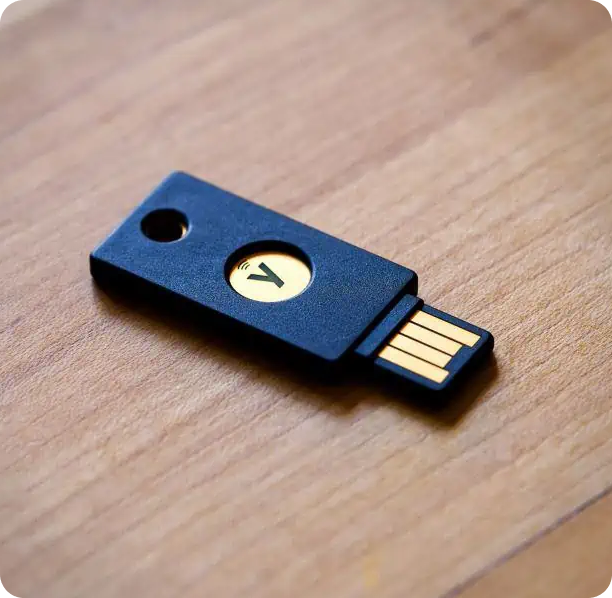
Code Signing Delivery Methods
New USB Token from Certificate Authority
By selecting this option, the Certificate Authority (CA) will dispatch a FIPS compliant USB token to the address that you used in your order form. This token is designed to handle encrypted modules securely and keep your private keys protected.
Existing Hardware Security Modules (HSM)
If you have already purchased a Hardware Security Module (HSM) or USB token that meets at least FIPS 140-2 Level 2 or Common Criteria EAL 4+ standards, you can utilize your existing key storage device. This allows you to uphold your current security measures while effortlessly incorporating it into the code signing workflow.
Use Cloud-Based Private Key Storage
By using this token method, you can use a cloud-based Hardware Security Module (HSM) and digital code signing platform to protect and store your private keys in a encrypted cloud-based environment.

Comodo Code Signing Certificate Support Center
- How to Generate Token-based Code Signing After Purchasing It
- OV Code Signing Validation for Organizations and Individuals
- FAQ's on Code Signing Digital Certificate
- Document Resource on Digital Code Signing Security Certificate
- 24/7 Hours CodeSignCert.com Support Center
- Explorer Comodo Code Signing Certificate Validation Requirements
Code Signing Insights from
Our Experts
View Insights



WE ARE RATED 4.8/5
![Five Star]()
REVIEWS & RATINGS at

Highly Recommend CodeSignCert.com
Fantastic support from CodeSignCert.com! They answered all my questions promptly. The customer service was exceptional, and the purchase process was seamless. Will definitely use their services again!
 Smith P.
Excellent Support and Service.
CodeSignCert.com's support team is outstanding! They responded quickly and resolved my issue within minutes. The purchase process was smooth and hassle-free. Highly recommend their services!"
Paul C.
Fast and Efficient Customer Support
I had an excellent experience with CodeSignCert.com. Their support was prompt and helpful. The purchase process was easy to follow, and the customer service was top-notch. Highly satisfied!
Russ B.
Outstanding Customer Service
CodeSignCert.com's support team went above and beyond to assist me. The customer service was friendly and efficient. Purchasing a certificate was quick and easy. Great experience overall!
Pascal L.
Our Trusted Clients Around The World







24/7 Help Desk
Create your support and sales ticket in minutes, and get support from an expert instantly.
30 Day Money Back Assurance
Get your refund with no question ask policy for your purchase, renewal, or order within 30 days of the initial order date.